
📦Module Engine
Including module configuration, data source configuration, interface replacement, dynamic button and other configurations
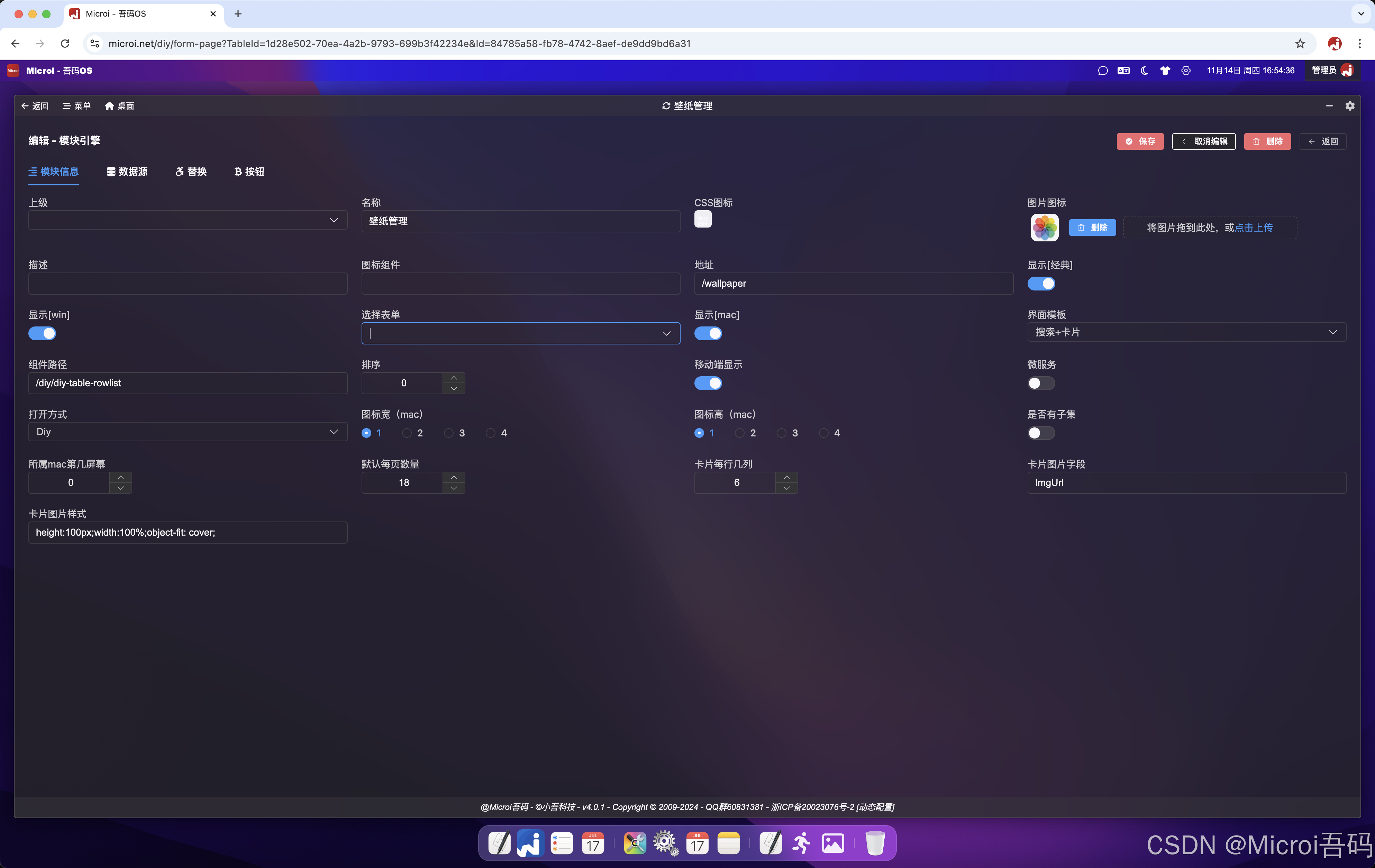
Module Configuration
How to open it
Diy
- Rendering with the form engine, opening is a table
Component
- to open with custom vue component, you need to fill in the custom component path
Iframe
- Open in iframe mode
//如要打开百度,则需要设置url地址为:/iframe/https://baidu.com
//可以在地址中跟上系统当前登录用户的token值,如:/iframe/https://baidu.com?token=$V8.CurrentToken$Address Interface Engine
- When the opening method is selected as Iframe, the interface engine of dynamic return address can be selected to realize single sign-on of third-party systems
Expand to view JavaScript code (22 lines)
js
//先取缓存
var cacheTokenKey = `Microi:${V8.OsClient}:IotToken-meslogin-jwlrd`;
var cacheToken = V8.Cache.Get(cacheTokenKey);
if(cacheToken){
  return { Code : 1, Data : 'https://第三方系统apibase/mg-ui/#/auto-login?token=' + cacheToken }
}
var result = V8.Http.Post({
  Url : 'https://第三方系统apibase/api/third/findAccessToken',
  PostParam : {
    userName : '账号',
    password : '密码',
  },
  // ParamType : 'json',
})
var resultObj = JSON.parse(result);
if(resultObj.code == 0 && resultObj.data && resultObj.data.token)//表示成功
{
  //缓存token
  V8.Cache.Set(cacheTokenKey, resultObj.data.token, '3.00:00:00');//缓存3天
  return { Code : 1, Data : 'https://第三方系统apibase/mg-ui/#/auto-login?token=' + resultObj.data.token};
}
return { Code : 0, Data : resultObj, Msg : result };SecondMenu
- Superior menu with submenu
Report
- Virtual Reports
Data Source Configuration
- Associated table:Which tables to join, set the table alias
- Query Columns:Select Which Fields
- Don't show columns:Some id fields do not need to be displayed on the table after select.
- Sortable Column:Which fields can be sorted
- Default Sort Column:Default multi-field sort
- Searchable Columns:Which fields can be searched
- Statistics column:Which fields need statistics
- Open in-table editing:After in-table editing is enabled, you also need to set editable columns.
- Join Association:Conditions for freely writing associated tables
- Where condition:Free to write where conditions to achieve access control Example [each person can only view their own data, or the superior can view the data of the subordinate of the same department]:
(A.UserId = '$CurrentUser.Id$' OR (B .Level > $CurrentUser.Level$ AND B .DeptCode LIKE '$CurrentUser.DeptCode$%'))
Note: The DIY table selected by default already occupies the table alias A.
Variable names that can be used:$CurrentUser. Id $, $CurrentUser. Level $, $CurrentUser. DeptId $, $CurrentUser. DeptCode $, $yyyy $, $yyyy-MM$(date format and so on)
- Import template:Prepare import templates in advance for users to download
- Table Paging Sequence Increment:Non-first page sequence number inherits page number
Interface Replacement
- query interface replacement
- All interface replacement addresses support $ApiBase $and $CsClient $variables, which are automatically obtained from system settings.
- [New] Mode Support pop-up and table
- Import Interface Replacement
Expand to view JavaScript code (53 lines)
js
//可以使用接口引擎实现导入接口,一旦替换了导入接口,那么导入进度(redis)也一定要设置
if(!V8.Param.TableId){
    return { Code : 0, Message : '必须指定一个TableId,以标记正在导入哪张表!' }
}
//判断当前表是否正在导入中,防止重复导入
var isImportingKey = `Microi:${V8.OsClient}:ImportTableDataStart:${V8.Param.TableId}`;
var importStepKey = `Microi:${V8.OsClient}:ImportTableDataStep:${V8.Param.TableId}`;
var importStepList = [];
if(V8.Cache.Get(isImportingKey) == '1'){
    return { Code : 0, Message : '注意:有数据正在导入!请导入结束后再操作。若进度异常,请联系系统管理员!' }
}
V8.Cache.Set(isImportingKey, '1');//标记正在导入

//写进度
importStepList.push(DateNow('yyyy-MM-dd HH:mm:ss') + ':正在读取文件数据...');
V8.Cache.Set(importStepKey, JSON.stringify(importStepList));

//获取excel数据
var filesByteBase64 = V8.FilesByteBase64;
var base64String = Object.values(filesByteBase64)[0];
var dataList = V8.Office.ExcelToList({
  FileByteBase64 : base64String,
  SheetIndex : 0//取第一张表
});
dataList.Data.forEach(item => {
  item.AAA = 111;
});

//写进度
importStepList.push(DateNow('yyyy-MM-dd HH:mm:ss') + ":已读取【" + dataList.Data.length + "】条数据!");
importStepList.push(DateNow('yyyy-MM-dd HH:mm:ss') + `:已导入【0】条数据...`);
V8.Cache.Set(importStepKey, JSON.stringify(importStepList));

dataList.Data.forEach((item, index) => {
  //循环导入数据
  var addResult = V8.FormEngine.AddFormData('tableName', item, V8.DbTrans);
  if(addResult.Code != 1){
    //返回错误结果,平台会自动回滚事务(禁止手动调用V8.DbTrans.Rollback())
    V8.Cache.Set(isImportingKey, '0');//取消标记正在导入
    //写进度
    importStepList.push(DateNow('yyyy-MM-dd HH:mm:ss') + `:导入出现错误:${addResult.Msg}。已回滚!`);
    V8.Cache.Set(importStepKey, JSON.stringify(importStepList));
    return { Code : 0, Msg : addResult.Msg };//平台识别到Code!=1,自动回滚事务
  }
  //写进度(覆盖上一条)
  importStepList[importStepList.length - 1] = DateNow('yyyy-MM-dd HH:mm:ss') + `:已导入【${index+1}】条数据...`;
  V8.Cache.Set(importStepKey, JSON.stringify(importStepList));
});
//写进度
importStepList.push(DateNow('yyyy-MM-dd HH:mm:ss') + `:导入成功,已结束!`);
V8.Cache.Set(importStepKey, JSON.stringify(importStepList));
V8.Cache.Set(isImportingKey, '0');//取消标记正在导入
return { Code : 1 };
- Import Progress Interface Replacement
js
if(!V8.Param.TableId){
    return { Code : 0, Message : '必须指定一个TableId,以标记要获取哪张表的导入进度!' }
}
//获取进度
var importStepStr = V8.Cache.Get(`Microi:${V8.OsClient}:ImportTableDataStep:${V8.Param.TableId}`);
return { Code :1, Data : JSON.parse(importStepStr) };
- Export Interface Replacement:See related articles: Microi code-custom export Excelmicori code-use interface engine to realize custom export excel
Dynamic button
- Form More Button
- Rows More Button
- More export buttons
- Batch Select More Buttons After adding at least one batch select more button, the data list will automatically open the batch check function
js
//批量删除数据
var selectData = V8.SelectedData;
if(selectData.length == 0){
  V8.Tips('请选择要删除的数据!', false);
  return;
}
V8.ConfirmTips(`确认批量删除选中的[${selectData.length}]条数据?`, async function(){
  var ids = selectData.map(item => { return item.Id });
  var result = await V8.FormEngine.DelFormData('diy_order', {
    Ids : ids
  });
  if(result.Code != 1){
    V8.Tips('删除失败:' + result.Msg, false);
    return;
  }
  V8.Tips('删除成功!');
  V8.RefreshTable({ _PageIndex : 1 })
});
- Page More Button
- Page Multi Tab
Platform Supported URL Parameters
- ShowClassicTop: If set to 0, the classic top content is not displayed. Default value is 1
- ShowClassicLeft: If set to 0, the classic left menu is not displayed. Default value is 1
- FormDataId: which data is opened by default in the data list
js
https://os.itdos.com/#/notice?ShowClassicTop=0&ShowClassicLeft=0&FormDataId=b8348d26-b395-4313-b97d-6e41f9ff5270